AGENTIC ENGINEERING
I Built an AI Agent That Finds My Forgotten Subscriptions — Here's Exactly How

Maria Shimkovska
Content Engineer
Last updated: May 8, 2026
May 5, 2026
6 min read


.png)
Dec 4, 2025
Dec 2, 2025
Nov 26, 2025
Join thousands of developers building the future with Orkes.
Here's how you can build any AI agent you want using Conductor and Agentspan, even if you've never built one before. I also cover what an AI agent is and go from a very simple agent to more complex examples. So whether you are new to AI agents and whether you have technical experience or not, the point is to get you to understand what they are and how you can build any agent you want essentially. This is for everyone who wants to understand what an AI agent is and how to actually build one.
In a follow up article I will build a second one and show you how you can make them "communicate" with each other, so they can work as a team.
If you end up following along, which I highly recommend, you can build and use this agent as well. It's a subscription analyzer that reads your email inbox, finds every recurring charge, flags the ones you've stopped using, and tells you exactly where to go to cancel them — and how much you'd save if you did. I plan on building more for myself because my email is never under at least a thousand unread emails.
Whenever I’m trying to wrap my head around something technical, I like to strip it down to the simplest version that actually works. Then build up from there.
In this article I am going to show you how you can build any AI agent you can think of using Orkes Conductor, a workflow orchestrator, as well as Agentspan), a free and open-source agent builder and runtime.
If you've followed my content before you'll know I have shown you how to build out an agent using just Orkes Conductor, but while Conductor is amazing for orchestration, the building of an agent part was a bit clunky. You were able to build a durable AI agent, but the developer experience could be improved to make it as seamless as possible. And this is where Agentspan comes into the picture. It takes all the durability that Conductor offers you while also focusing just on building and running durable AI agents. And yes, you can add them to your workflows after that.
At its core an AI agent is just a piece of software, a program, that uses an LLM (large language model) or SLM (small language model) to plan and execute toward a goal it's given. You can give it that goal, or another agent or an event can. During that journey of trying to achieve its goal, the agent has access to tools that let it check your email, search the internet, or look through your proprietary database to find or update things.
Now regarding the name, the AI part of an agent comes from the LLM (or SLM). And it's an agent because it has some agency to "decide" how to achieve that goal (given limits, of course).
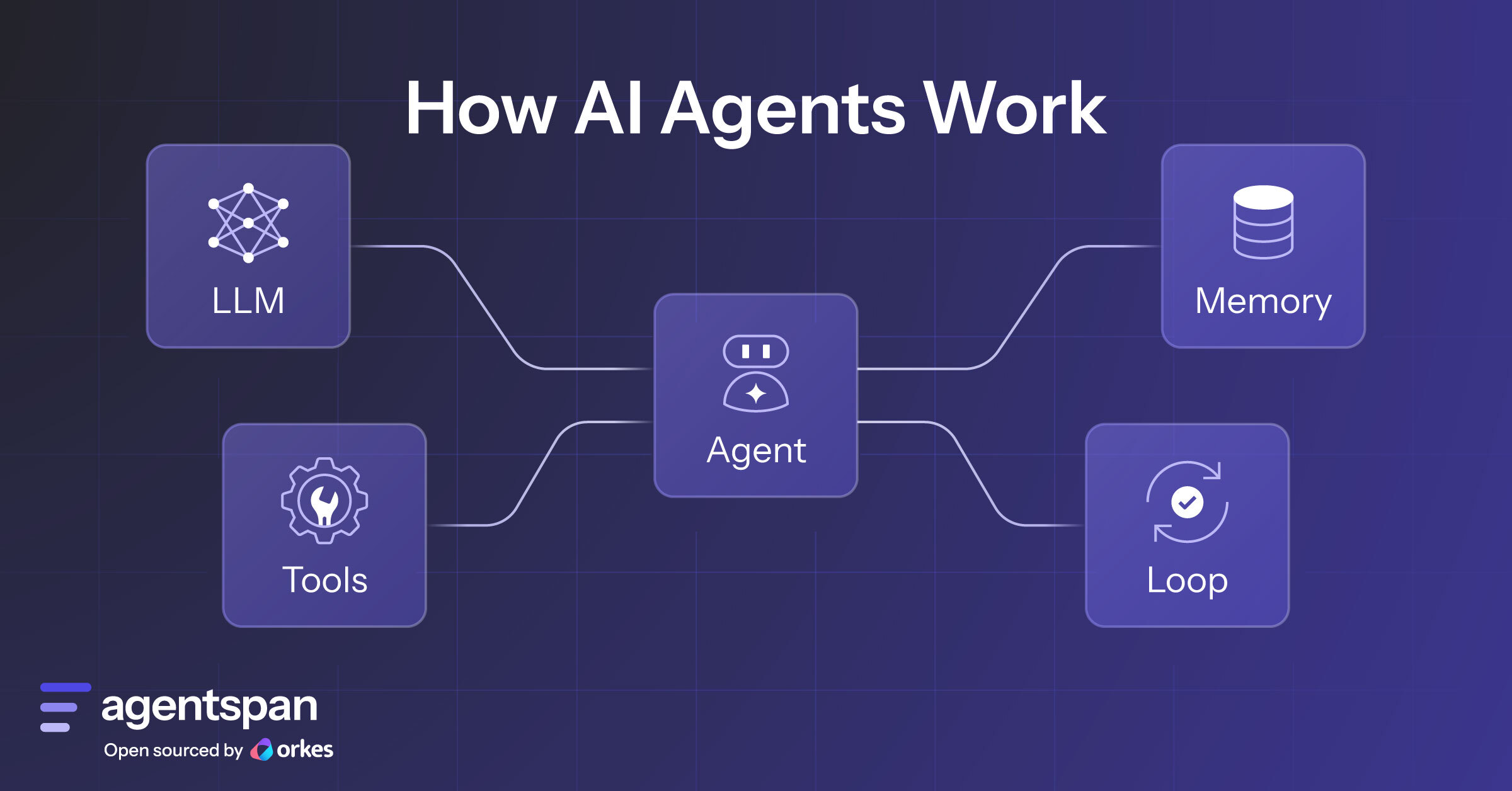
There’s a lot of noise about what an “agent” is. Here’s the minimal stack most folks agree on (right now, but things change):
These run in a loop so the agent can try → check → improve. If something doesn’t fully work, it goes back and finds another way.
I have a much more detailed article if you're interested, "AI Agents 101".
Under the hood, Agentspan runs on Conductor, a workflow orchestration engine. Conductor is what makes your agents durable so if a tool call fails, it retries, and if the process crashes mid-run, it picks up where it left off, and if you need your agent to hand off to a human and wait for a response, Conductor handles that too. It's built for production.
What Agentspan does is sit on top of Conductor and give you a clean and simple way to define and run your AI agents without having to think about the orchestration layer at all. You write your tools, write your instructions, define your agent, and run it. It makes things a whole lot easier and faster.
The best part is that once you've built your agent with Agentspan, you can then plug it directly into any Conductor workflow. So if you already have a pipeline, say a customer onboarding flow or a data processing job, then your agent just becomes another step in it.
Build the agent with Agentspan, orchestrate everything else with Conductor.
So here is an agent you can build and use for yourself. I added comments in the code so you can understand what each part does. I also kept it intentionally simple with minimal code. This is all built using Agentspan too so it's open sourced and free.
pip install agentspan
So that you have the SDK and CLI on your machine.
export ANTHROPIC_API_KEY=your_key_here
So that the agent can call the AI model. Without this it won't know how to authenticate.
agentspan server start
So that there's a local runtime ready to execute your agent. Agentspan runs on top of Conductor, which needs a server process running in the background to handle the agent's work.
You can get an Anthropic API key from console.anthropic.com. If you want to use a different model provider, Agentspan supports OpenAI, Google, and others too — just swap the model string.
Here's what an agent actually looks like in code:
from agentspan.agents import Agent, AgentRuntime, tool

agent = Agent(
  name="subscription_finder",
  model="anthropic/claude-sonnet-4-6",
  tools=[search_emails, get_email_body],
  instructions=INSTRUCTIONS
)
That's it. Four lines. A name, a model, a list of tools it can call, and instructions for how to behave. Everything else — the reasoning, the decisions about which emails to read, the report — comes from the model following those instructions.
This is the insight worth holding onto: the agent definition itself never changes. Only the tools and instructions do. Swap them out and you have a completely different agent.
Tools are just regular Python functions with a @tool decorator. That decorator is what tells the agent "you can call this." Without it, the function is invisible to the agent.
This agent has two tools:
@tool
def search_emails(query: str) -> list:
    """Search the inbox for emails matching a query.

    Returns a list of email summaries: [{id, subject}, ...].
    """
    # Returns sample data so you can try the agent without any setup
    return [{"id": r["id"], "subject": r["subject"]} for r in SAMPLE_RECEIPTS]

@tool
def get_email_body(email_id: str) -> str:
    """Fetch the full text body of a specific email by ID."""
    for receipt in SAMPLE_RECEIPTS:
        if receipt["id"] == email_id:
            return receipt["body"]
    return ""
The docstrings matter here — the model reads them to understand what each tool does and when to use it. Write them like you're explaining to a smart colleague, not like you're writing a spec.
Notice that these tools currently return sample data. That means you can run this agent right now, without connecting anything, and see it work. We'll swap in real Gmail later.
The instructions are where the agent's intelligence lives. This is what shapes how the agent thinks, what it looks for, and what it produces. Changing this is what turns a subscription finder into an expense tracker, a PR reviewer, or a job application manager.
INSTRUCTIONS = """
  You are a subscription analyst with access to the user's email inbox.

  First, decide what kind of question this is:

  - GENERAL KNOWLEDGE / CHITCHAT (math, greetings, anything unrelated to email):
    Answer directly. Do not call any tools.

  - SIMPLE INBOX QUESTION (how many emails, unread count):
    Call get_inbox_stats and answer in one or two sentences. Done.

  - GENERAL EMAIL QUESTION (what emails did I get this month, emails from a sender):
    Call search_emails with an appropriate query, then summarize conversationally.
    No report format, just answer the question directly.

  - SUBSCRIPTION ANALYSIS (find subscriptions, what should I cancel, billing charges):
    Do the full analysis below.

  For subscription analysis, do exactly this in order:
  1. Call search_emails ONCE with the query "invoice receipt subscription renewal".
  2. Look at the subject line and preview of each email returned.
     Only call get_email_body for emails whose subject clearly suggests
     a recurring charge, subscription, renewal, or billing — skip anything else.
  3. After reading each qualifying email, output a line in this format:
     FOUND: <vendor> | $<amount> | <monthly/annual> | <one sentence about usage>
  4. After going through all emails, write a final report with these sections:

  💸 SPENDING SUMMARY — each subscription with amount, billing frequency, annual cost
  ⚠️ CANCEL THESE — unused or duplicate subscriptions with the cancellation URL
  ✅ KEEP THESE — subscriptions with clear active usage
  💰 POTENTIAL SAVINGS — total monthly and annual savings from cancellations

  Use emojis. Write like a helpful friend going through your bills with you.
"""
The routing logic at the top is important. Without it, the agent would treat every question as a subscription analysis and run a full report when someone just asks "how many emails do I have." Instructions give the agent judgment. What I find useful is testing the agent and playing around with the prompt to find a really good one. It can be hard to get this right on the first or even second try.
By default the agent runs silently and returns a result at the end. But you can stream events as they happen so like tool calls, results, thinking, completion, which makes the agent feel more "alive" and interactive and gives you visibility into what it's doing.
def handle_events(handle):
    email_subjects = {}

    for event in handle.stream():
        if event.type == EventType.TOOL_CALL:
            if event.tool_name == "search_emails":
                print(f"\n  Searching: {event.args.get('query', '')}")
            elif event.tool_name == "get_email_body":
                email_id = event.args.get("email_id", "")
                subject = email_subjects.get(email_id, email_id)
                print(f"  Reading: {subject}")

        elif event.type == EventType.TOOL_RESULT:
            if event.tool_name == "search_emails" and isinstance(event.result, list):
                for item in event.result:
                    if isinstance(item, dict) and "id" in item:
                        email_subjects[item["id"]] = item.get("subject", item["id"])
                print(f"  Found {len(event.result)} emails to review\n")

        elif event.type == EventType.DONE:
            result = event.output.get("result", event.output) if isinstance(event.output, dict) else event.output
            print("\n" + str(result).strip())
EventType.TOOL_CALL fires when the agent decides to use a tool. EventType.TOOL_RESULT fires when the tool returns. EventType.DONE fires when the agent has finished. You get to see the reasoning in real time.
Wrap everything in a simple loop and you have a chatbot that keeps running until you type exit:
with AgentRuntime() as runtime:
    print("Hey! I'm your subscription analyst.")
    print("Ask me to find your subscriptions, or just chat.")
    print("Type 'exit' to quit.\n")

    while True:
        try:
            prompt = input("You: ").strip()
        except (EOFError, KeyboardInterrupt):
            print("\nGoodbye!")
            break
        if not prompt:
            continue
        if prompt.lower() in ("exit", "quit", "bye"):
            print("\nGoodbye!")
            break

        print()
        handle_events(runtime.start(agent, prompt))
        print()
AgentRuntime is the execution environment. runtime.start() sends a prompt to the agent and returns a handle you can stream events from. Each question is a fresh run. The agent doesn't remember the previous one unless you add memory, which is a natural next step.
Here's the complete agent in one file you can copy, save as subscription-agent.py, and run:
from agentspan.agents import Agent, AgentRuntime, tool, EventType
import os

# Sample inbox — swap for real Gmail API calls when you're ready
SAMPLE_RECEIPTS = [
    {"id": "msg_8821", "subject": "Your Spotify Family plan renewal",
     "body": "Spotify Family. We charged $15.99 to your card on Apr 28. Last listened: yesterday."},
    {"id": "msg_8456", "subject": "Spotify Premium receipt",
     "body": "Spotify Premium ($9.99) renewed on Apr 28. Account inactive: no plays in 90 days."},
    {"id": "msg_9134", "subject": "Adobe Creative Cloud renewed",
     "body": "Your free trial converted to Creative Cloud paid plan on Apr 1. Charged $52.99/mo. Last sign-in: never."},
    {"id": "msg_7402", "subject": "Equinox monthly billing",
     "body": "Equinox membership charged $39.00 on Apr 15. Last gym check-in: Dec 12, 2024."},
    {"id": "msg_9011", "subject": "Calm subscription renewed",
     "body": "Calm subscription ($14.99) renewed on Apr 22. Last app open: Sep 2024."},
    {"id": "msg_7711", "subject": "Netflix Premium",
     "body": "Netflix Premium ($22.99) charged on Apr 18. Last watched: yesterday."},
    {"id": "msg_8432", "subject": "NYT Digital",
     "body": "New York Times Digital ($4.25/mo) renewed Apr 10. Articles read this month: 23."},
    {"id": "msg_9999", "subject": "ChatGPT Plus",
     "body": "ChatGPT Plus ($20.00) renewed Apr 5. Last used: today."},
    {"id": "msg_5544", "subject": "iCloud+ storage",
     "body": "iCloud+ ($2.99) renewed Apr 1. Storage used: 87%."},
]

@tool
def search_emails(query: str) -> list:
    """Search the inbox for emails matching a query.

    Returns a list of email summaries: [{id, subject}, ...].
    """
    return [{"id": r["id"], "subject": r["subject"]} for r in SAMPLE_RECEIPTS]

@tool
def get_email_body(email_id: str) -> str:
    """Fetch the full text body of a specific email by ID."""
    for receipt in SAMPLE_RECEIPTS:
        if receipt["id"] == email_id:
            return receipt["body"]
    return ""

INSTRUCTIONS = """
  You are a subscription analyst with access to the user's email inbox.

  First, decide what kind of question this is:

  - GENERAL KNOWLEDGE / CHITCHAT (math, greetings, anything unrelated to email):
    Answer directly. Do not call any tools.

  - SIMPLE INBOX QUESTION (how many emails, unread count):
    Answer based on what you know. Done.

  - GENERAL EMAIL QUESTION (what emails did I get this month, emails from a sender):
    Call search_emails with an appropriate query, then summarize conversationally.

  - SUBSCRIPTION ANALYSIS (find subscriptions, what should I cancel, billing charges):
    1. Call search_emails ONCE with "invoice receipt subscription renewal".
    2. Only call get_email_body for emails that clearly suggest a recurring charge.
    3. After reading each qualifying email:
       FOUND: <vendor> | $<amount> | <monthly/annual> | <one sentence about usage>
    4. Write a final report with:

    💸 SPENDING SUMMARY — each subscription with amount, frequency, annual cost
    ⚠️ CANCEL THESE — unused or duplicate subscriptions with the cancellation URL
    ✅ KEEP THESE — subscriptions with clear active usage
    💰 POTENTIAL SAVINGS — total monthly and annual savings

  Use emojis. Write like a helpful friend going through your bills with you.
"""

agent = Agent(
    name="subscription_finder",
    model="anthropic/claude-sonnet-4-6",
    tools=[search_emails, get_email_body],
    instructions=INSTRUCTIONS
)

def handle_events(handle):
    email_subjects = {}
    for event in handle.stream():
        if event.type == EventType.TOOL_CALL:
            if event.tool_name == "search_emails":
                print(f"\n  Searching: {event.args.get('query', '')}")
            elif event.tool_name == "get_email_body":
                email_id = event.args.get("email_id", "")
                subject = email_subjects.get(email_id, email_id)
                print(f"  Reading: {subject}")
        elif event.type == EventType.TOOL_RESULT:
            if event.tool_name == "search_emails" and isinstance(event.result, list):
                for item in event.result:
                    if isinstance(item, dict) and "id" in item:
                        email_subjects[item["id"]] = item.get("subject", item["id"])
                print(f"  Found {len(event.result)} emails to review\n")
        elif event.type == EventType.DONE:
            result = event.output.get("result", event.output) if isinstance(event.output, dict) else event.output
            print("\n" + str(result).strip())

with AgentRuntime() as runtime:
    print("\nHey! I'm your subscription analyst.")
    print("Ask me to find your subscriptions, spot duplicates, or flag unused services.")
    print("Type 'exit' to quit.\n")

    while True:
        try:
            prompt = input("You: ").strip()
        except (EOFError, KeyboardInterrupt):
            print("\nGoodbye!")
            break
        if not prompt:
            continue
        if prompt.lower() in ("exit", "quit", "bye"):
            print("\nGoodbye!")
            break
        print()
        handle_events(runtime.start(agent, prompt))
        print()
Run it with:
python subscription-agent.py
Try asking: "what subscriptions should I cancel?" — and watch it work through the emails step by step.
The agent works great on sample data, but the real magic happens when you point it at your actual inbox. Here's how to do it in four steps.
1. Enable the Gmail API
Go to Google Cloud Console, create a project, and enable the Gmail API. Then create OAuth 2.0 credentials (choose "Desktop app") and download the file as credentials.json into the same folder as your script.
2. Install the Gmail client libraries
pip install google-auth-oauthlib google-auth-httplib2 google-api-python-client
3. Set the environment variable and run
USE_GMAIL=true python subscription-agent.py
The first time you run it, a browser window will open asking you to authorize access. After that it saves a token.json file so it won't ask again.
4. What changes in the code
The only thing that changes is the two tool functions. The agent definition stays identical so the same four lines. Here's what the real Gmail versions look like:
@tool
def search_emails(query: str) -> list:
    """Search the inbox for emails matching a query.

    Returns a list of email summaries: [{id, subject, preview}, ...].
    """
    service = _get_gmail_service()
    # Run focused searches one term at a time — combining with spaces means AND,
    # which is too restrictive and returns nothing
    queries = ["invoice", "receipt", "subscription", "renewal"]
    seen_ids = set()
    summaries = []
    for q in queries:
        r = service.users().messages().list(
            userId="me", q=q, maxResults=5, includeSpamTrash=False
        ).execute()
        for m in r.get("messages", []):
            if m["id"] not in seen_ids:
                seen_ids.add(m["id"])
                detail = service.users().messages().get(
                    userId="me", id=m["id"], format="metadata",
                    metadataHeaders=["Subject"]
                ).execute()
                headers = detail.get("payload", {}).get("headers", [])
                subject = next(
                    (h["value"] for h in headers if h["name"] == "Subject"), "(no subject)"
                )
                summaries.append({
                    "id": m["id"],
                    "subject": subject,
                    "preview": detail.get("snippet", "")
                })
    return summaries[:15]

@tool
def get_email_body(email_id: str) -> str:
    """Fetch the full text body of a specific email by ID."""
    import base64, re, time
    time.sleep(1)  # Avoid hitting Gmail API rate limits
    service = _get_gmail_service()
    msg = service.users().messages().get(
        userId="me", id=email_id, format="full"
    ).execute()
    payload = msg.get("payload", {})
    text = ""
    if "parts" in payload:
        for part in payload["parts"]:
            if part.get("mimeType") == "text/plain":
                data = part["body"].get("data", "")
                text = base64.urlsafe_b64decode(data).decode("utf-8", errors="ignore")
                break
    else:
        data = payload.get("body", {}).get("data", "")
        if data:
            text = base64.urlsafe_b64decode(data).decode("utf-8", errors="ignore")
    # Strip HTML and truncate so the model doesn't choke on huge email bodies
    text = re.sub(r"<[^>]+>", " ", text)
    text = re.sub(r"\s+", " ", text).strip()
    return text[:500]
The agent doesn't know or care whether it's reading sample data or real Gmail. It just calls the tools and trusts the result.
You've seen the full pattern. Here's the thing: you can take the exact same four-line agent definition and turn it into something completely different just by swapping the tools and instructions.
A job application tracker:
read_spreadsheet, search_emails_from_recruiter, get_email_bodyA receipt expense categorizer:
search_receipts, get_receipt_body, write_to_csvA PR review notifier:
get_open_prs, get_pr_diff, post_slack_messageThe agent definition in all three cases:
agent = Agent(
    name="your_agent_name",
    model="anthropic/claude-sonnet-4-6",
    tools=[your_tools_here],
    instructions=YOUR_INSTRUCTIONS
)
Same structure. Different tools, different instructions, completely different agent. That's the whole idea.
If you've made it this far, just run it. You don't need Gmail, you don't need any setup beyond an API key. Two commands and a copy-paste and you'll have a working AI agent running on your machine.
1. Install Agentspan
pip install agentspan
So that you have the SDK and the CLI available on your machine.
2. Set your API key
# Pick whichever you have
export ANTHROPIC_API_KEY=your_key_here
export OPENAI_API_KEY=your_key_here
So that the agent can actually call the AI model. Without this it won't know which model to use or how to authenticate.
3. Start the Agentspan server
agentspan server start
So that there's a local runtime ready to execute your agent. Agentspan runs on top of Conductor, which needs a server process running in the background to handle the agent's work.
4. Copy this into a file called agent.py and run it
from agentspan.agents import Agent, tool, run

@tool
def get_weather(city: str) -> str:
    """Get current weather for a city."""
    return f"72°F and sunny in {city}"

agent = Agent(
    name="weatherbot",
    model="anthropic/claude-sonnet-4-6",  # or "openai/gpt-4o"
    tools=[get_weather],
)

result = run(agent, "What's the weather in NYC?")
result.print_result()
python agent.py
So yeah, that's a real AI agent already. It's simple and super small, but it's a real one. It decides to call the tool, calls it, reads the result, and forms a response.
Once that works you can swap the tool for something that touches your actual data. The subscription agent from this article is a good next step because it uses the exact same pattern, just with email tools and more detailed instructions.
Copy the full file from the section above, run it, and ask it "what subscriptions should I cancel?"
Watch it work through the emails and tell you exactly what to cut. ☺️
You can also take a look at the Agentspan site and check out more examples.